shieldiomaker
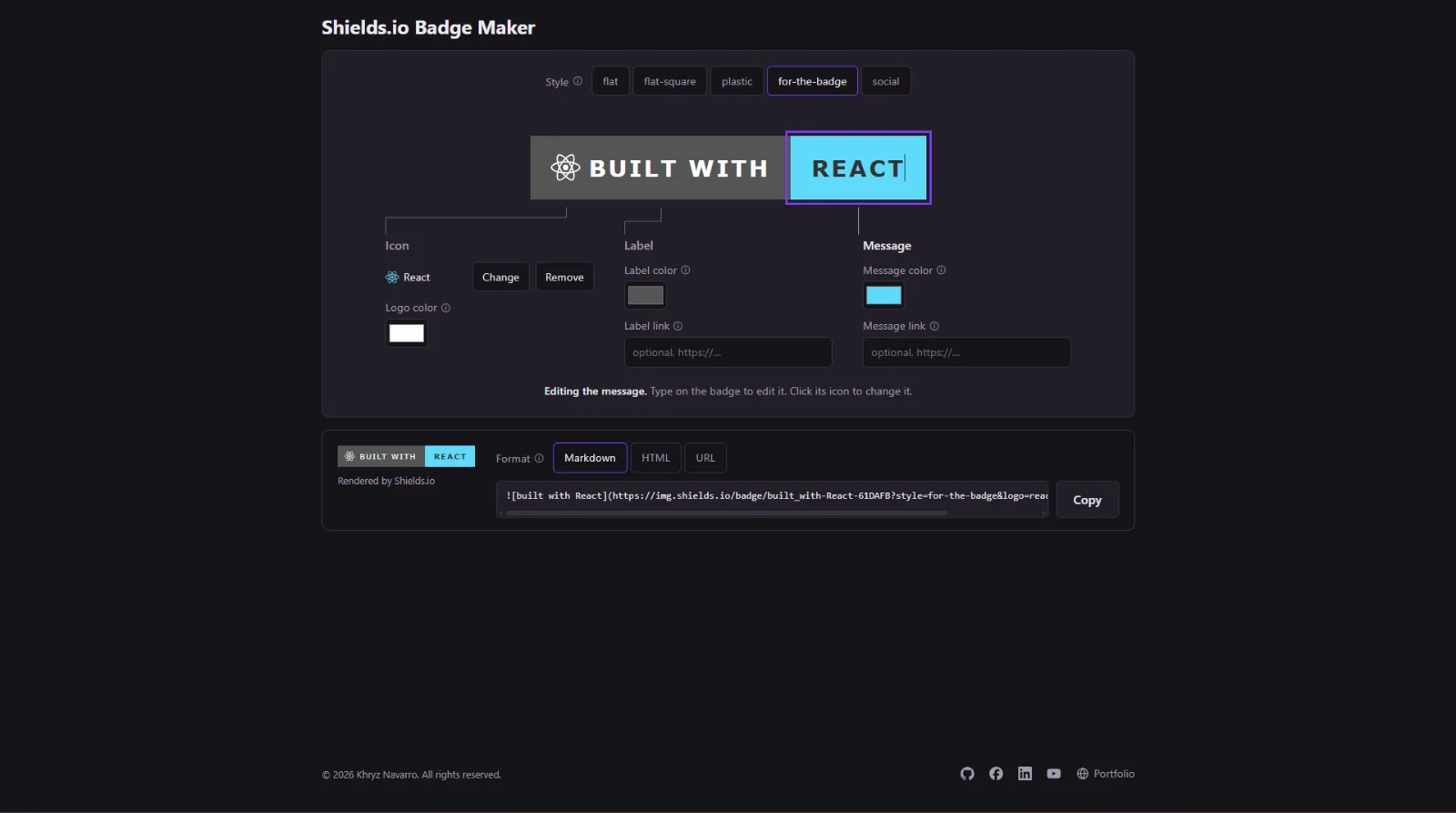
A browser-based editor for Shields.io static badges, with logos from Simple Icons. You type straight onto a large live b
README
Shields.io Badge Maker
A browser-based editor for Shields.io static badges, with logos from Simple Icons. You type straight onto a large live badge, pick a brand icon visually, and copy the result as Markdown, HTML or a plain URL.
It runs entirely in the browser: no backend, no accounts, and nothing to deploy beyond static files.
Live site: https://khryz-navarro.github.io/shieldiomaker/
Contents
- Features
- How to use it
- How it works
- Getting started
- Scripts
- Project structure
- Limitations
- Credits
- License
- Author
Features
Edit the badge in place
- Type on the badge itself. The label and message halves of the large badge are text fields. On a desktop browser the caret starts in the message half, so you can type right away.
- Only the half you are editing lights up, with a violet outline that eases in. A status line under the badge says which part you are editing.
- Five Shields.io styles:
flat,flat-square,plastic,for-the-badgeandsocial. The editable badge imitates each one, including Shields' rule of dark text on light colors. - Empty states are visible: an empty label shows as a dashed placeholder half, and with no message the Copy button is disabled until you type one.
Icons and logos
- Visual Simple Icons picker. Click the icon on the badge to open a picker of every Simple Icon (3,467 in the bundled version). Popular icons show before you type, and search matches names and slugs.
- Brand color on pick. Choosing an icon sets the message color to the brand's color. It also fills in the message with the icon's name, unless you have typed your own.
- Custom logos. For logos Simple Icons doesn't have, upload an SVG or PNG under 6 KB. It is embedded in the badge URL, so no hosting is needed.
- Logo color for Simple Icons logos. Uploaded logos keep their own colors.
Colors and links
- Message color and label color pickers. The label defaults to Shields grey (
#555555) and has a reset. - Optional links for each half. Set a label link and a message link; each half of the badge can point somewhere different.
Output
- Live Shields.io render. The real
img.shields.iobadge sits next to the snippet, so what you see is what you paste. - Copy as:
- Markdown:
, wrapped in a link when one is set. - HTML: an
<img>, wrapped in<a>when a link is set. - HTML, 2 links: an
<object>embed so each half keeps its own link. It appears only when both links are set. - URL: the raw badge URL.
- Markdown:
- One-click copy that shows "Copied", or "Copy failed, select the snippet" if the browser blocks clipboard access.
Usability
- A tooltip on every option. Hover any field's name (marked with an info icon) for a short explanation.
- Keyboard friendly. Every control is a native input, button or radio, so focus works with the browser's own ring, and Escape closes the icon picker.
- Light and dark themes follow your system setting.
- Responsive. The page collapses to a single column on phones.
How to use it
- Pick a style with the buttons above the badge.
- Type the label in the left half of the badge, or leave it empty for a single-section badge.
- Type the message in the right half.
- Choose a logo: click the icon slot on the badge (or Change in the Icon group), then search and pick one. If the logo isn't there, use Upload logo.
- Adjust colors and links in the Icon, Label and Message groups under the badge.
- Copy the snippet: choose Markdown, HTML or URL and press Copy.
How it works
Everything happens in src/badge.js, a small set of pure functions covered by tests.
Building the badge URL
Badges use the Shields.io static badge endpoint:
https://img.shields.io/badge/<label>-<message>-<color>?<options>
Escaping. In the path,
-and_are separators, so they are doubled (--,__). Spaces become_, and everything is URL-encoded. For example,built-with/my_app v1becomesbuilt--with-my__app_v1.No label. With an empty label, the path is just
<message>-<color>.Options are added only when they differ from the defaults:
Option When it's added styleAny style other than flatlogoA Simple Icons slug (e.g. react) or a custom logo's data URIlogoColorA Simple Icons logo is set. It's left out for custom logos, because Shields ignores it there. labelColorA custom label color is set link(repeated)Any link is set. The first linkis the left half, the second is the right. An empty value leaves that half unlinked.
Text color
The editable badge uses Shields' own brightness rule: (r·299 + g·587 + b·114) / 255000 ≥ 0.69 gets dark text (#333), otherwise white.
Custom logos
Shields.io's logo option accepts a Simple Icons slug or a base64 data URI, but not a link to an image. Uploaded files are therefore read in the browser and embedded as data:image/svg+xml;base64,… or data:image/png;base64,….
The 6 KB limit comes from testing img.shields.io directly. A ~6 KB SVG (an 8,189-character URL) rendered, while a ~12 KB one was rejected with HTTP 431, meaning the request was too large. Files with an empty MIME type fall back to their .svg or .png extension.
Links and where they work
Markdown and <img> can only make the whole badge one link, so those outputs use the message link (or the label link when it is the only one). Separate links per half only work when the SVG is embedded with <object>, and GitHub strips <object> from READMEs.
Getting started
Requirements
- Node.js
^20.19.0or>=22.12.0(required by Vite 8) - npm
Install and run
git clone https://github.com/Khryz-Navarro/shieldiomaker.git
cd shieldiomaker
npm install
npm run dev
Then open the local URL Vite prints (usually http://localhost:5173).
Build for production
npm run build
The static site is written to dist/. Preview the build locally with npm run preview.
Deployment
Every push to master runs .github/workflows/deploy.yml. It installs dependencies, runs the tests, builds, and publishes dist/ to GitHub Pages. The site is served from /shieldiomaker/, which is set as base in vite.config.js; change it if the repo is renamed or hosted elsewhere.
Scripts
| Command | What it does |
|---|---|
npm run dev |
Starts the Vite dev server with hot reload |
npm run build |
Builds the production site into dist/ |
npm run preview |
Serves the production build locally |
npm run lint |
Lints the source with Oxlint |
node --test src/badge.test.js |
Runs the unit tests for the badge helpers (Node's built-in test runner) |
Project structure
shieldiomaker/
├── index.html              Page shell
├── public/
│   └── favicon.svg
├── src/
│   ├── main.jsx            React entry point
│   ├── App.jsx             The whole UI: badge editor, callouts, icon picker, output, footer
│   ├── badge.js            Pure helpers: badge URL, text color, custom logo checks
│   ├── badge.test.js       Tests for badge.js (node --test)
│   └── index.css           Styles and design tokens (light and dark)
Tech stack
- React 19 on Vite 8
simple-icons16 for icon titles, slugs, brand colors and SVG paths- Oxlint for linting
- Node's built-in
node:testfor tests
Limitations
- Bundle size. Every Simple Icons path ships with the page, about 2.2 MB gzipped. Loading icons on demand would make the first load much faster.
- Custom logos aren't saved. An uploaded logo, like everything else on the page, is lost on reload.
- Icon freshness. Shields.io resolves
logo=<slug>against its own copy of Simple Icons, which can lag behind the bundled package, so a very new icon may not render yet. - Large custom logos make long URLs. A logo near 6 KB produces a URL of about 8,000 characters. Shields.io accepts it, but other image proxies (such as GitHub's) may have their own limits.
- Two-link badges don't work on GitHub, because GitHub strips
<object>.
Credits
- Badges rendered by Shields.io.
- Icons from Simple Icons, released under CC0. Brand icons are trademarks of their respective owners.
- This project is not affiliated with or endorsed by Shields.io or Simple Icons.
License
Released under the MIT License.
Author
Khryz Navarro
- GitHub: @Khryz-Navarro
- Portfolio: khryz-navarro.github.io/portfolio
- LinkedIn: khryz-navarro
- YouTube: @khryznavarro1521
- Facebook: navarro.khryz
© 2026 Khryz Navarro. All rights reserved.
Journey
No updates yet.