yabsyabs
🚀 Shipped it — CV Tailor is now live!
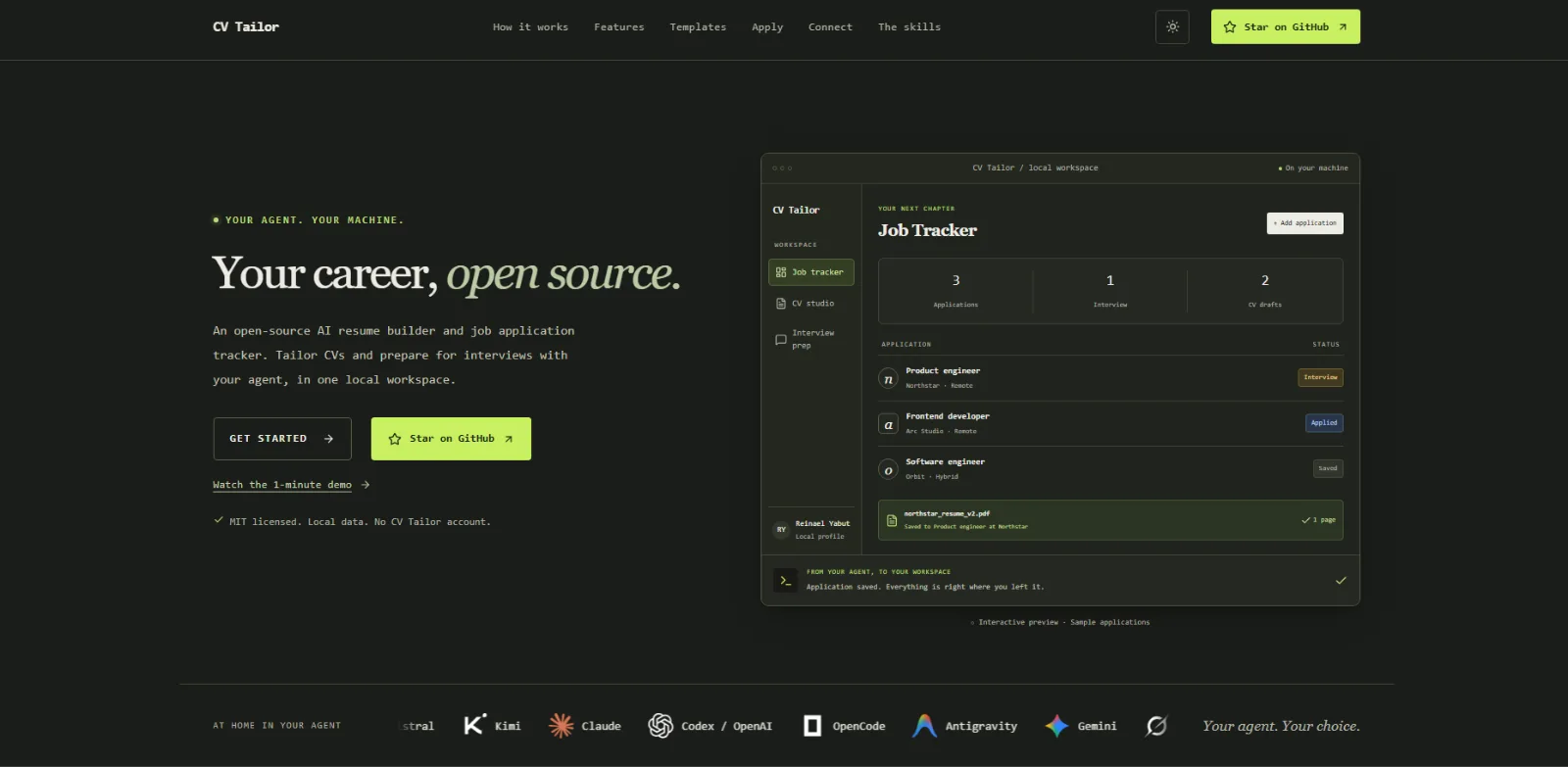
A local career workspace for your AI agent, with an optional dashboard. Import your experience, tailor one-page resumes…
A local career workspace for your AI agent, with an optional dashboard. Import your experience, tailor one-page resumes and cover letters, research jobs, prepare for interviews, and track applications in a SQLite database on your machine.
Your agent handles reasoning and writing; CV Tailor provides persistent records, typed inputs and outputs, document rendering, and reviewable drafts. Use an agent that can read repository skills and run shell commands, such as Codex, Claude Code, OpenCode, or Antigravity. Browsing and employer-form assistance depend on the tools available in that agent session.
Start with Python 3.12+ and Git. CLI use requires no CV Tailor account, AI API key, Node.js, Docker, or database server. Your chosen agent supplies its own AI access. The dashboard and built-in provider AI are optional.
| Task | What CV Tailor provides | Agent skills |
|---|---|---|
| Maintain your profile | Experience, education, projects, certifications, and confirmed skills | cv-profile |
| Find and assess jobs | URL/description intake, requirement comparisons, sourced research | cv-jobs, cv-job-fit, cv-company-research |
| Tailor documents | One-page resumes, targeted edits, cover letters, draft history, exports | cv-resume, cv-resume-edit, cv-cover-letter |
| Track applications | Statuses, notes, follow-ups, archives, documents, pipeline snapshots | cv-tracker, cv-snapshot |
| Assist with forms | Recoverable answers and checkpoints tied to selected documents | cv-apply, cv-browser |
| Prepare for interviews | Plans, practice feedback, cheat sheets, Python exercises | cv-interview, cv-code-practice |
| Connect your tools | Guided setup for notes, spreadsheets, CRMs, calendars | cv-connect, cv-calendar |
Start multi-step career work with cv-tailor. It loads saved context and routes work to focused skills. Confirm extracted facts before saving your profile or using them in applications.
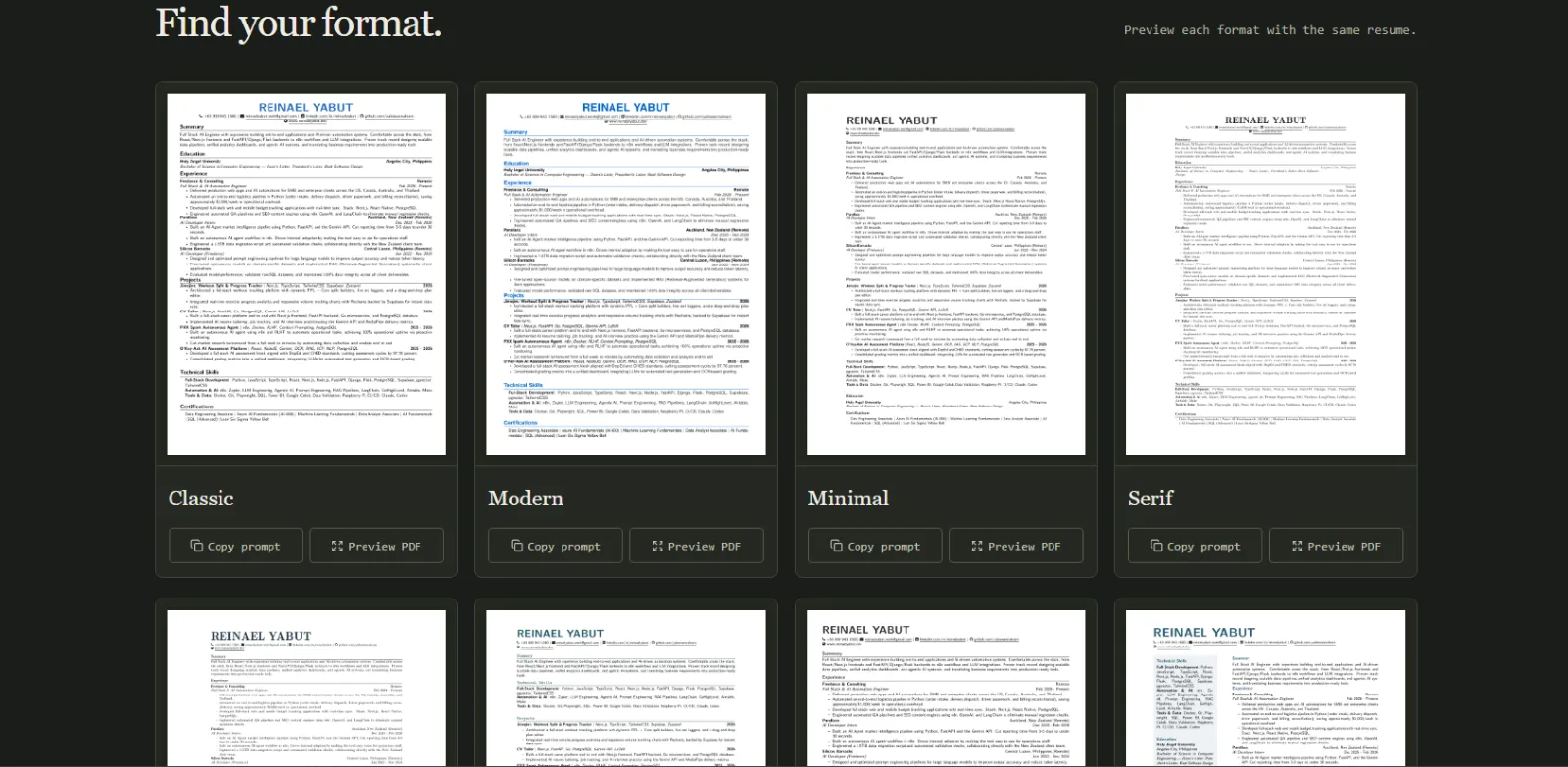
Eight visual resume Templates are available: Classic, Modern, Minimal, Serif, Executive, Technical, Compact, and Sidebar. A Preset steers content for a professional role; a Template controls appearance. They are independent. Run cv-tailor --json templates list for template IDs.
CV Tailor has three parts:
/api endpoints, from one Python process on localhost. It shares the CLI's SQLite workspace.flowchart TD
Agent[User and local AI agent] --> Skills[Repository skills]
Skills --> CLI[Python CLI]
Browser[Local dashboard in browser] --> HTTP[FastAPI: dashboard and /api]
CLI --> Services[Shared Python workspace and services]
HTTP --> Services
Services --> SQLite[(Local SQLite workspace)]
Services --> Documents[Document assembly, compilation, and checks]
Services -. optional API AI .-> Providers[Configured AI providers]
Public[Public visitors] --> Landing[Independent static landing page]
In default external-agent mode, skills export saved context and a JSON output schema. Your agent prepares structured content and imports it through the CLI. CV Tailor validates it, saves a draft, and renders documents where applicable. API mode explicitly enables provider calls for supported dashboard workflows.
SQLite uses foreign keys, WAL, and short write transactions shared across CLI and dashboard processes. Revision checks protect edits, and request receipts make identical create/import retries safe. Slow compilation and provider work happen outside write transactions.
Resume content is plain-text JSON. Python assembles LaTeX and compiles it with Tectonic or an available XeLaTeX installation. The AI does not generate LaTeX. PDF checks enforce the one-page rule and report ATS warnings. An ATS Check evaluates document formatting; it is not a numerical match score or hiring prediction.
The dashboard resume editor offers structured fields, PDF preview, and raw LaTeX over the same LaTeX source. A Spot Edit rewrites a contiguous run of Blocks within one Section while preserving unrelated content; see the domain rules in CONTEXT.md.
CV-Tailor/
├── ai-service/
│   ├── pyproject.toml           # Python package, CLI entrypoint, optional extras
│   ├── cv_tailor/
│   │   ├── cli.py              # Command-line adapter
│   │   ├── workspace.py        # Shared operations and draft lifecycle
│   │   ├── config.py           # Workspace path, environment, capabilities
│   │   ├── database.py         # SQLite engine and sessions
│   │   ├── schema_changes.py   # Versioned upgrades and Preset seeds
│   │   ├── main.py             # FastAPI app and local access checks
│   │   ├── dashboard.py        # Dashboard packaging and launcher
│   │   ├── browser*.py         # Optional browser adapter, wizard, MCP
│   │   ├── models/             # Persistence and typed content schemas
│   │   ├── routers/            # HTTP adapters mounted under /api
│   │   ├── services/           # Career tasks, documents, providers, execution
│   │   └── sandbox/            # Optional Docker workers and image
│   └── tests/                  # Backend and CLI tests
├── frontend/                   # Optional dashboard: Next.js, React, TypeScript
│   ├── src/app/(workspace)/    # Profile, tracker, documents, practice, insights
│   ├── src/components/         # Shared interface components
│   ├── src/lib/                # API helpers, caches, resume editing, state
│   └── tests/                  # Unit and Playwright browser tests
├── landing/                    # Independent public product site
├── .agents/skills/cv-*/         # Canonical career workflows
├── .claude/skills/cv-*/         # Generated Claude entrypoints
├── scripts/                    # Installer, hooks, skill sync, assets
├── .github/workflows/          # Backend and static-build CI
├── .githooks/                  # Guards against direct main commits/pushes
├── docs/                       # Guides, ADRs, historical plans
├── AGENTS.md                   # Repository operating instructions
└── CONTEXT.md                  # Domain language and architectural constraints
A checkout may have an older folder name such as CV Tailor Go; the current application is Python and Next.js. No Go PDF service is required. The active Python package is ai-service/cv_tailor.
| Component | Needed for |
|---|---|
| Git | Cloning and updating |
Python 3.12+ with pip and venv |
All installations |
| AI agent with shell access | Guided career workflows in external-agent mode |
| Node.js 22+ and npm | Building the optional dashboard or landing page |
| Network access | Dependency installation, first-use TeX package downloads, online research/job sources |
| Playwright and a supported browser | Optional application browser adapter or browser tests |
| Python Tk support | Optional native sign-in wizard |
Poppler: pdftoppm, pdftotext |
Regenerating resume gallery assets |
| Docker with a Linux engine | Explicit Docker execution mode and its opt-in tests |
Node.js is unnecessary for CLI-only use or serving an already packaged dashboard. The base Python package includes the Tectonic integration through tecto; a full TeX installation is optional. On Linux, pip, venv, and Tk may be separate distribution packages.
Run from a terminal, using python3 instead of python if that names your Python 3.12+ installation:
git clone https://github.com/yabswannalearn/CV-Tailor.git
cd CV-Tailor
python scripts/install.py --cli-only
The installer creates a repository .venv, installs the package in editable mode, and initializes the workspace. Running python scripts/install.py interactively offers CLI-only or CLI + dashboard; CLI-only is the default. To build the dashboard immediately, install Node.js 22+ and use --with-dashboard instead.
Activate the environment in each new terminal:
# Windows PowerShell, from the repository root
.venv\Scripts\Activate.ps1
# macOS / Linux, from the repository root
. .venv/bin/activate
Check the installation:
cv-tailor --json status
cv-tailor doctor
cv-tailor --json preferences get
status should report initialized: true, the workspace path, and available capabilities. ai.mode: "external" and dashboard_installed: false are expected for a fresh CLI-only install. doctor reports Python, Node, execution mode, and compiler availability.
Without activation, use these executables or the environment's Python with -m cv_tailor:
| Platform | CLI | Python |
|---|---|---|
| Windows | .venv/Scripts/cv-tailor.exe |
.venv/Scripts/python.exe |
| macOS / Linux | .venv/bin/cv-tailor |
.venv/bin/python |
The remaining examples assume an active virtual environment and the repository root as the working directory.
Open your agent in this checkout and provide your CV and a job description or URL. For example:
Read AGENTS.md and use .agents/skills/cv-tailor/SKILL.md. Load my saved workspace first. Help me import my CV, confirm my profile facts, compare this job with my experience, and save a tailored resume and cover letter as drafts for the application.
The agent should reuse your saved profile and preferences in later sessions. If its host does not discover repository skills automatically, give it the skill path explicitly. The CLI can also be used directly, but does not supply external-agent reasoning itself.
With Node.js 22+ and npm installed:
cv-tailor dashboard install
cv-tailor dashboard
dashboard install installs the Python dashboard extra, runs npm ci and the production build in frontend/, and copies frontend/out into the Python package's static assets. It does not enable built-in AI.
Open the local dashboard. The launcher opens a browser automatically; stop it with Ctrl+C. For another port or a terminal-only launch:
cv-tailor dashboard --port 8001 --no-open
In external-agent mode, use Work with your CLI agent → Copy agent prompt, paste it into your agent in this checkout, and save the result through the CLI. The dashboard reads the same saved records. Review a draft before selecting it as the current application document.
The API provides health and interactive documentation. Keep the server on localhost: this single-user application has no account authentication and accepts local, same-origin requests. The public landing page is deployed independently.
Commands accept --json and --data-dir before or after subcommands. Errors return nonzero exit codes and structured output in JSON mode. Inputs accept a JSON filename or --input - for stdin; prefer these over shell-escaped JSON.
cv-tailor --help
cv-tailor applications --help
cv-tailor drafts import --help
cv-tailor schema profile
cv-tailor schema application
cv-tailor schema resume
Load or import your profile. Have the agent extract selectable CV text and prepare profile.json using schema profile. Confirm the facts before import:
cv-tailor profile extract-text /absolute/path/cv.pdf
cv-tailor profile import --input profile.json
cv-tailor --json profile get
Importing over an existing profile requires its current --revision. Scanned PDFs need agent OCR tools or user-supplied text.
Save a job. Prepare job.json with the actual posting. This illustrative minimum should be replaced with your job details:
{
  "company_name": "Example Company",
  "job_title": "Software Developer",
  "job_description": "Paste the actual job description here.",
  "status": "Saved"
}
cv-tailor applications add --input job.json --request-id unique-job-create-id
cv-tailor applications list --archived no
cv-tailor applications get 1
Replace 1 below with the returned application ID. A Job Source is where you found the role; it is distinct from job_url and may be unknown.
Export context and import the agent's result. Context contains saved facts, job details, preferences, previous drafts, evidence, instructions, and the output schema:
cv-tailor --json context export --task resume --application 1
cv-tailor drafts import --kind resume --application 1 --input resume.json --request-id unique-resume-import-id
cv-tailor drafts import --kind cover_letter --application 1 --input cover-letter.json --request-id unique-letter-import-id
cv-tailor drafts list --application 1
The agent prepares resume.json and cover-letter.json using their schemas. These imports validate and save results without calling a model.
Review, check, export, and select documents. Draft IDs differ from application IDs. Here 2 is an example resume draft ID:
cv-tailor drafts get 2
cv-tailor resume check 2
cv-tailor drafts export 2 --format pdf --output resume.pdf
cv-tailor drafts export 2 --format docx --output resume.docx
cv-tailor applications get 1
cv-tailor drafts apply 2 --revision 1
Use the application's latest revision, not the example value 1. Applying a resume or cover-letter draft selects its current document and retains earlier drafts. It does not submit an employer form or mark the job Applied. Export formats depend on draft kind; see the focused document skill.
cv-tailor jobs fetch https://example.com/job
cv-tailor jobs search "Python developer"
cv-tailor applications list --status Interview
cv-tailor applications stats
cv-tailor applications insights
cv-tailor applications insights --include-archived
cv-tailor resume blocks 2
cv-tailor forms prepare --application 1 --resume 2
cv-tailor practice problems
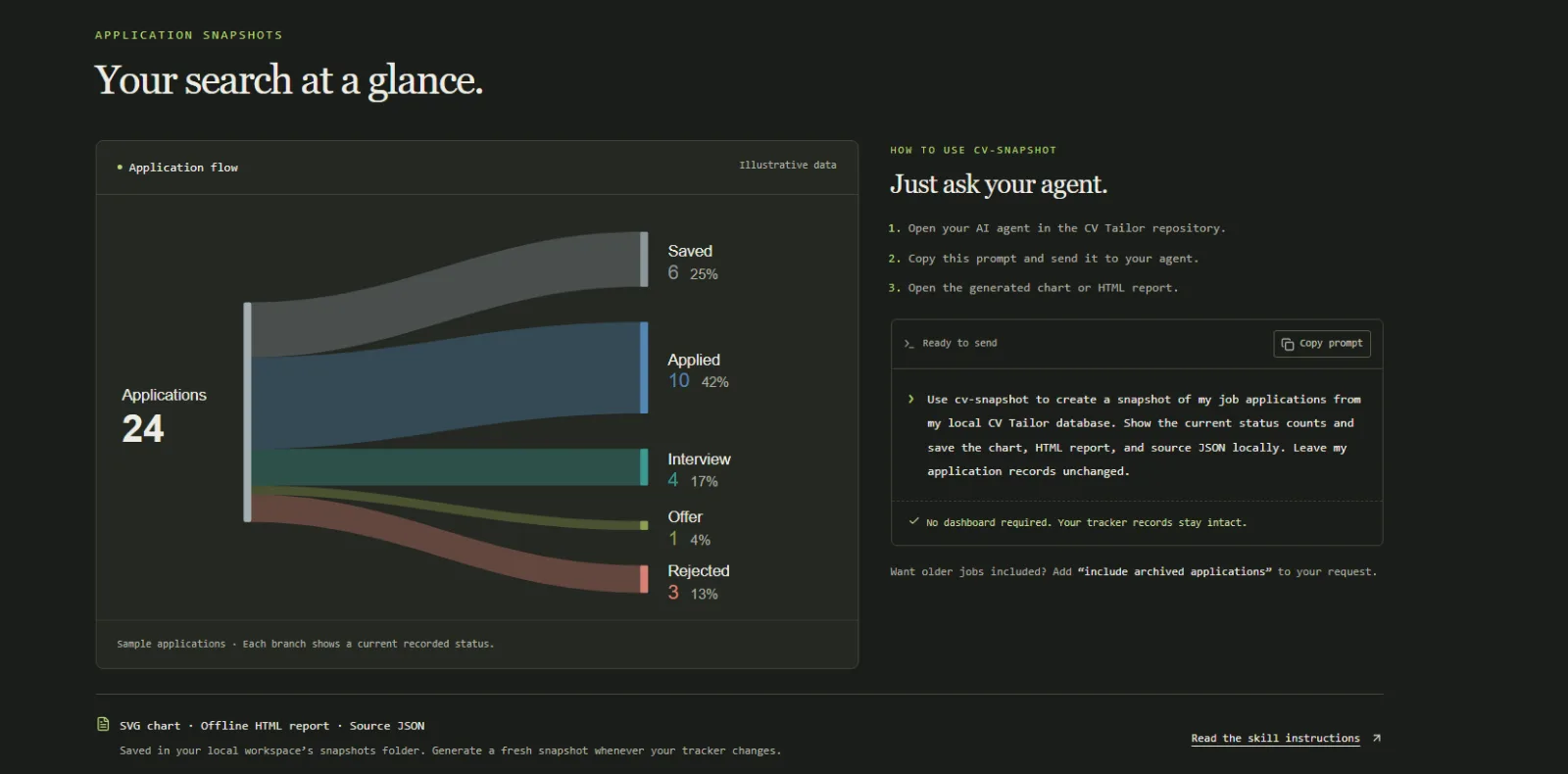
Job-source availability varies; search returns source diagnostics. URL intake or pasted descriptions remain available. For portable reports, ask “Use cv-snapshot to visualize my application pipeline.” It saves an SVG, standalone HTML, and source JSON under the workspace's snapshots/ directory without a dashboard server.
--evidence facts.json on draft import/revise, resume patch, or practice save. They remain scoped to that conversation/application; saving them to the profile is a separate choice.The default workspace lives outside the checkout:
~/.cv-tailor/
├── cv-tailor.sqlite3        # Profile, applications, drafts, preferences, receipts
├── .env                    # Optional runtime/provider settings
├── browser/                # Optional per-site profiles and staged files
└── snapshots/              # Reports generated on request
On Windows, ~ is your user profile directory. status prints the absolute path. Each workspace has one career profile; its email is contact information, not a login. Multiple clones share this default workspace, and repository updates do not remove it. Agent-host chat histories remain in that host; CV Tailor stores records and results saved through its own interfaces.
Storage is local; your selected AI agent/provider may process the context you supply to it. Online research, job sources, and optional publishing also contact their respective services.
Use --data-dir or CV_TAILOR_HOME for another workspace. The command-line choice takes precedence. Pass the same directory to every related command and dashboard launch:
python scripts/install.py --cli-only --data-dir /absolute/path/career-workspace
cv-tailor --data-dir /absolute/path/career-workspace --json status
cv-tailor --data-dir /absolute/path/career-workspace dashboard
init creates and seeds SQLite automatically; schema upgrades back up an existing versioned database before changes. Normal setup needs no separate migration command. Importing legacy hosted PostgreSQL accounts is not implemented.
For manual backups, stop the dashboard and other writers, then copy the whole workspace directory to a private backup location. Restore the complete backup while those processes are stopped. Back up integration configuration and credentials separately if used. Browser profiles contain authenticated session data; protect backups accordingly.
Read cv-tailor --json preferences get and reuse the saved defaults. Create a nonsecret preferences.json to update selected fields:
{
  "resume_template": "modern",
  "tracking_connection": { "provider": "notion", "config_path": null }
}
cv-tailor --json preferences set --revision 1 --input preferences.json
Replace 1 with the current preference revision. Application-specific templates override the default; changing the default does not rewrite existing applications. "tracking_connection": null chooses SQLite-only tracking.
calendar_connections separately supports one googlecalendar and one outlook connection. Each stores a provider and absolute path to a nonsecret JSON setup file, or null before setup. Preserve the latest list when changing one provider; [] clears remembered calendars. Disconnecting a preference does not revoke authorization or delete calendar events.
Credentials never belong in preferences. Remembering a provider or setup file does not prove the connection works or authorize publishing.
yabsyabs
Building a dev tool or hiring developers? Get seen here. Become our Sponsor
Building a dev tool or hiring developers? Get seen here. Become our Sponsor